
Scorpius Controller
Pc Lap Counter works with the Scorpius controller:
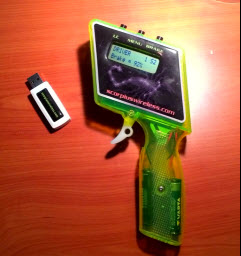
Since version 5.31, Pc Lap Counter works with the Scorpius Wireless controller (only on a Scalextric Digital track with a C7042 powerbase).
At the moment, the Scorpius controller part of Pc Lap Counter is still a beta version.
To connect your Scorpius controller, you need a Scorpius dongle (1 dongle can manage up to 6 controllers). You do not need to put Scorpius chips into your cars: the data from the Scorpius controller (throttle level, lane change and brake) are sent to the dongle wirelessly, and Pc Lap Counter forwards the controller data from the dongle to the Scalextric C7042 powerbase, which sends it to the car.
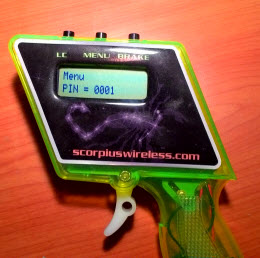
The link between the controller and the car ID is made through the PIN ID of the Scorpius controller: PIN ID = car ID in Pc Lap Counter.
Manuals and information on the Scorpius Wireless system are available on the Scorpius website.
Here is a video showing the Scorpius Wireless controller used with Pc Lap Counter:
How to configure Pc Lap Counter for the Scorpius Wireless controller:
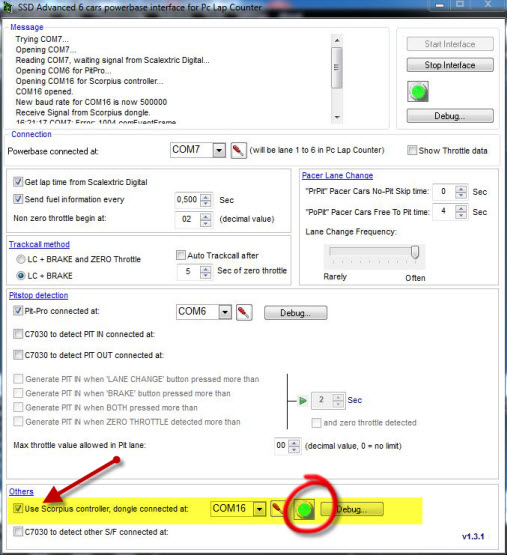
- In the C7042 interface of Pc Lap Counter, tick the option “Use Scorpius controller”.
- Specify the COM port used by the Scorpius dongle.
- Press the “Start interface” button; if the connection with the Scorpius dongle is OK, you will see the green LED.
- Good to know:
- Check the PIN ID , Pc Lap Counter use the PIN ID of the Scorpius controller to identify the car ID.
- Check that no controller is plugged on the C7042 powerbase for the Car ID controlled by the Scorpius Controller (If you set Scorpius controller to use car#1, it mean that no controller can be plugged on the powerbase for car#1)
- Check the version of the Scorpius Controller Firmware, It must be at least firmware 9.7 Since Pc Lap Counter 5.33d.
- Check the PIN ID , Pc Lap Counter use the PIN ID of the Scorpius controller to identify the car ID.