
DS Racing DS-0045
Pc Lap Counter works with the DS-0045 DS interface:
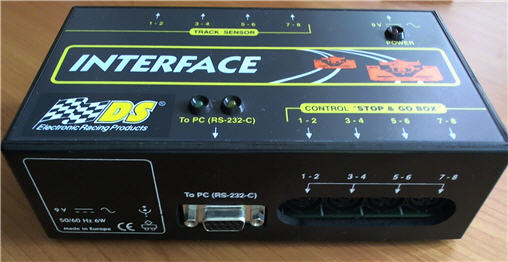

If your computer does not have a serial port, you can use a USB/RS232 adapter.
Since version 5.19, Pc Lap Counter includes an interface that takes control of the DS-0045 DS interface.
With Pc Lap Counter, your DS interface gains more functionality such as sound, rotation, teams, gap, lap history, large display, and more (more than WinSlot).
For power control, you can use a Phidget interface. For your information, the DS-0045 can now receive commands from the computer, such as “start race” (the DS-300 and DS-200 cannot receive commands). This means Pc Lap Counter can indirectly control a DS Stop & Go box: if you connect your Stop & Go box to the DS-0045, Pc Lap Counter can control the track power without any additional power control hardware:
How to configure Pc Lap Counter for the DS-0045 DS interface:
- Start Pc Lap Counter normally.
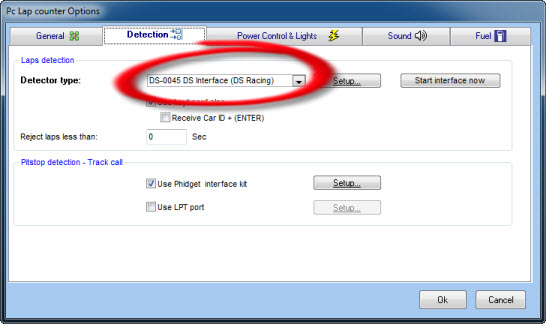
- In the options screen of Pc Lap Counter, choose “DS-0045 DS interface” as the detector and click the “setup...” button.
- Change the serial port if necessary..
- Then you only need to assign drivers to lanes when you set up a race.
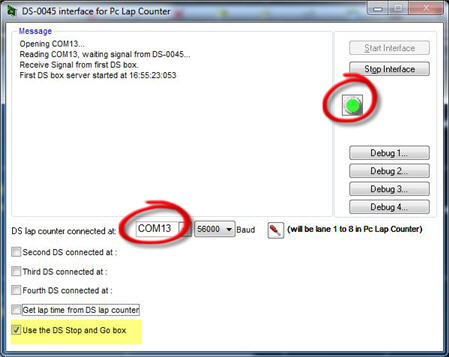
Option “use the DS Stop and Go box”: enable this option if you have a DS Stop & Go box DS-0061 or DS-0021.