
Webcam Pitstop
Using a webcam as a pit stop detector for Pc Lap Counter:
You can detect pit stops using a webcam and a special program that can detect movement in one or more areas.
I tried Web Zone Trigger. It is perfect for pit stop detection, because it can run a program when movement is detected in a specified area (you can specify more than one area).
In version 4.26, I added a simple program called pitstop.exe that Web Zone Trigger can use to send the pit stop detection to Pc Lap Counter (the program is in the directory c:\Pc Lap Counter).
The pitstop.exe program accepts the lane/car number as a parameter.
Here is a short guide on how to set up Zone Trigger for pit stop detection:
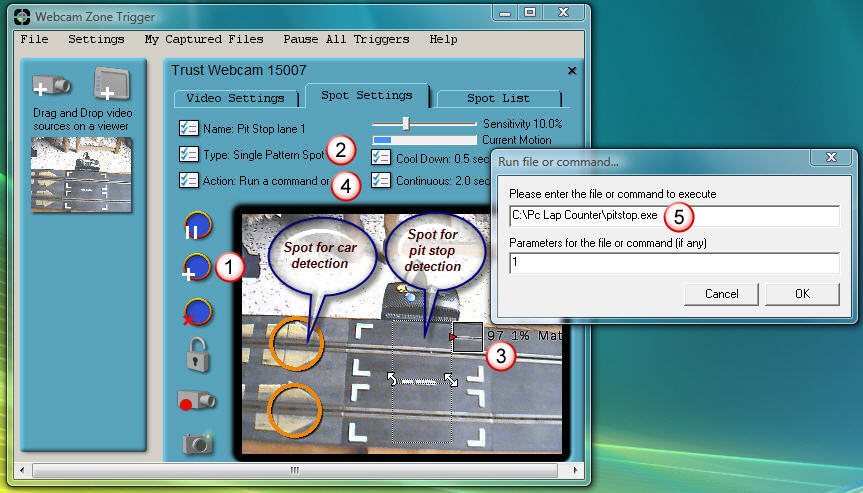
1 - Add a Spot to detect the pit stop.
2 - It is a single-pattern Spot (available only in the Zone Trigger Pro version).
3 - Click “set” to take a picture of the place without a car.
4 - The Spot runs the program pitstop.exe.
5 - Specify the program name to run and the lane number.
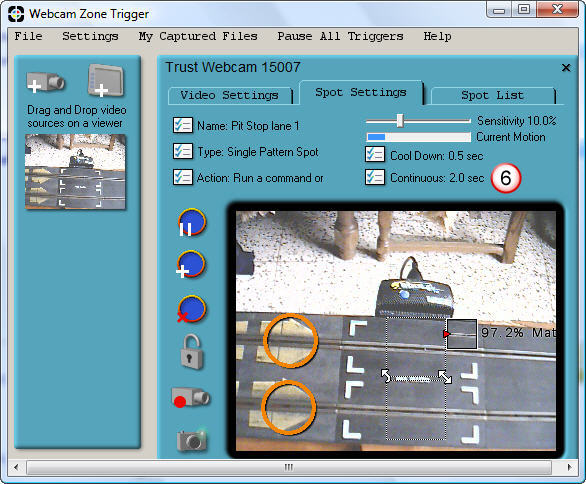
6 - The Spot must run the program only when the car stays in the zone for 2 seconds.
Here is a video of Pc Lap Counter and Zone Trigger in action: