
Parallel port pitstop
Using the parallel port for pit stops:
Warning: Pc Lap Counter only supports the parallel port on Windows XP, and only an onboard parallel port; PCI parallel ports, USB converters, etc. are not supported.
Since version 4.41, Pc Lap Counter can use the parallel port to detect pit stops. To do so, specify the input pin that your pit stop sensors will activate.
Pc Lap Counter only initiates a pit stop when the car stays over the detector for 2 seconds, so you can also use your lap counting sensors for pit stop detection.
Setting up Pc Lap Counter for parallel port “pit stop”:
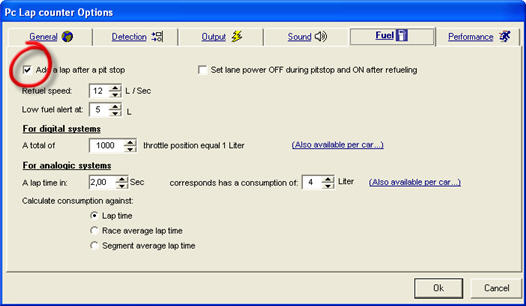
- In the options screen, the option “Add a lap after a pit stop” must be ON (whether you use your lap counting sensors for pit stop detection as well, or separate pit stop sensors).
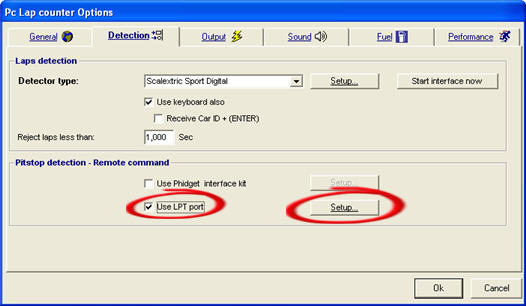
- In the options screen, specify that you will use the parallel port for pit stop detection too and click the “setup” button, like here:
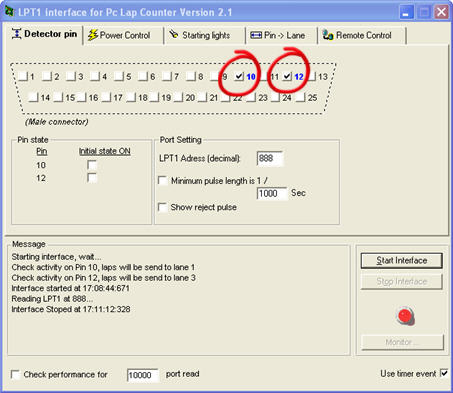
- After you click the “setup” button, the LPT interface of Pc Lap Counter starts. Specify the input pins used by your sensors:
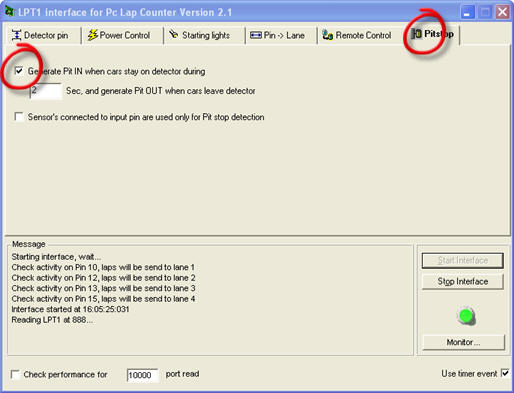
- In the “Pitstop” tab, specify that the car must stay on the sensor for 2 seconds to initiate a pit stop, like this:
- Now just minimize the LPT interface and close the options screen by clicking “OK”.