
Scalextric Powerbase Pro
Pc Lap Counter works with the Scalextric Sport Digital Powerbase Pro (PB-Pro):
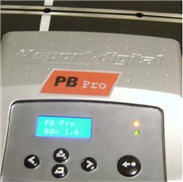
Since version 4.47, Pc Lap Counter is compatible with the PB-Pro (version 1.8).
More information about the PB-Pro
Since version 5.02, Pc Lap Counter is also compatible with the Pit-Pro.
What Pc Lap Counter can do with the PB-Pro:
- Reduce the cars’ top speed according to the fuel tank level.
- Send the drivers’ hand controller settings, including the throttle curve.
- Specify each driver’s car top speed; for kids, for example, you can set it to 75%.
- Control the track power when starting, pausing, resuming or stopping a race.
- Manage the “pacer driver” / ghost cars.
- Automatically enable/disable cars.
- Manage PB-Pro track call
- When a driver fails to serve his stop & go penalty, PCLC sets his car’s power to 50%.
- Manage 2 PB-Pros (useful for 4-lane tracks).
- Since version 5.18, you can start/stop pace car mode (yellow flag).
How to set up Pc Lap Counter for the PB-Pro:
First, to enable the PB-Pro in Pc Lap Counter, you need to set up Pc Lap Counter to work with Scalextric Digital.
Then, in the options screen of Pc Lap Counter, specify that you will use the PB-Pro functions:
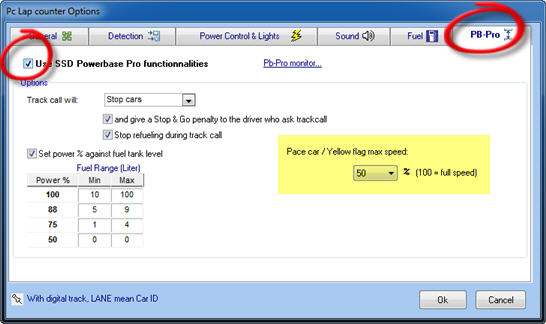
- Track call will:
When a driver requests a “track call”, you can specify whether the cars have to stop or slow down.
- Since version 4.48, you can give a stop & go penalty to the driver who requested the track call and also stop the refuelling of all cars. - Set power % according to fuel level:
When ticked, Pc Lap Counter calculates the car’s top speed according to the fuel tank level, without exceeding the maximum power % allowed for each driver (for a “pacer driver”, it is always the maximum power % allowed, because there is no fuel management for that kind of driver).
When unticked, Pc Lap Counter simply sets the car’s top speed to the maximum power allowed for each driver
(PB-Pro 1.6 can set the power to 100, 88, 75 or 50%). - Power - Fuel range:
Here you specify the relationship between the fuel tank level and the power %.
In this example, a car with a fuel tank level between 2 L and 50 L has full power (100%), and between 51 L and 70 L it has 88% of power. - PB-Pro monitor:
Displays PB-Pro data in real time, so you can see the power %, the throttle min/max values, etc. during the race. - Pace car / yellow flag max speed:
See the pace car explanation
- For each driver, you can specify his hand controller settings and the maximum power allowed; the driver settings are sent to the PB-Pro each time the driver takes part in a race:
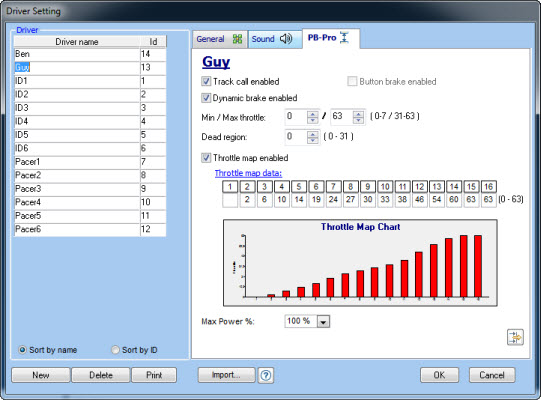
- Max power %:
This limits the top speed of the driver’s car; for kids, for example, you can set it to 75%.  This button sends the new driver settings to the PB-Pro, so you can easily see, for example, the effect of the pacer speed on a car during a race (even if you do not click this button, PCLC updates the PB-Pro when you confirm the screen).
Note:
You can update the driver settings and the general options during a race; Pc Lap Counter takes the new values into account and sends them to the PB-Pro.
- PB-Pro monitor:
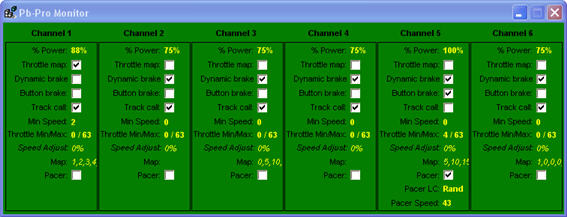
The PB-Pro monitor displays in real time the data that will be sent to the PB-Pro, so you can see the power %, the throttle min/max values, etc. during the race.
