Pit-Pro
Pc Lap Counter works with the Pit-Pro:
Since version 5.02, Pc Lap Counter works with the Pit-Pro, a modified Pit Lane Game (C7041) that detects pit IN/OUT and lets race management software like Pc Lap Counter control all the lights of the PLG (of course, the Pit-Pro only works on a Scalextric Digital track with a C7030 or C7042 powerbase).
The Pit-Pro is a product developed by the PB-Pro team (it is not a Scalextric product). To buy it, just e-mail the Pit-Pro team.
Warning:
the “simple” Pit-Pro lets you detect pit IN but not pit OUT! To detect pit OUT, you need the “Deluxe” Pit-Pro, which includes a modified single-lane half straight (C7016) connected to the PLG. Pc Lap Counter works ONLY with the “Deluxe” Pit-Pro.
What Pc Lap Counter can do with the Pit-Pro:
- Detect pit IN / OUT.
- Give a Stop & Go penalty when a driver goes too fast in the pit lane area.
- Light up the PLG lights like this:
- Big green lights up when the track is opened and flash during a trackcall.
- Big red lights up when the track is closed, slow flash during race pause and fast flash during countdown.
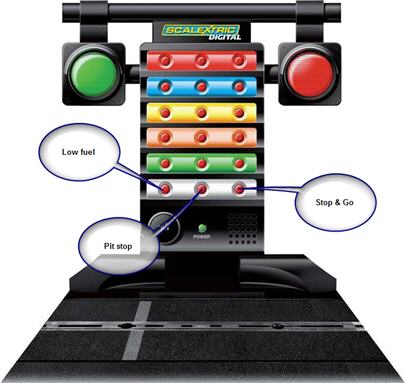
- For each driver Pc Lap Counter lights up 3 lights like this:
- The left one is for fuel, middle one is for the Pit Stop and the right one is for the stop & go penalty.
- Fuel light will medium flash when the tank reach 20% and will fast flash when the tank reach the low fuel valuet (see fuel management options).
- During refuel the low fuel AND the pit stop light will medium flash , if the car move during the refueling these 2 lights will not more flashing and the refuel is pausing, when the tank is full only the pit stop light will fast flash.
- Stop & Go light will fast flash when the driver get a Stop & Go penalty
Here are some videos showing the Pit-Pro used with Pc Lap Counter:
How to configure Pc Lap Counter for the Pit-Pro:
- First you need to set up Pc Lap Counter to work with Scalextric Digital.
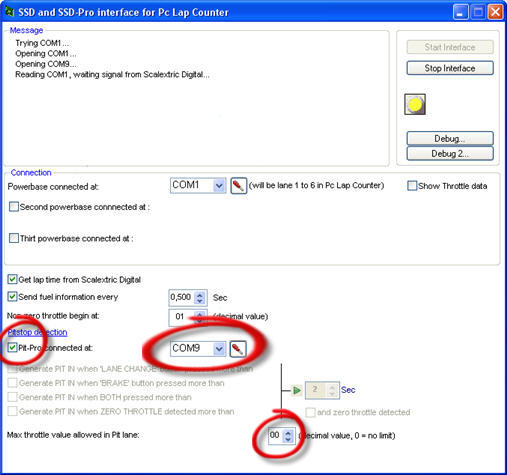
- In the SSD interface of Pc Lap Counter, tick the Pit-Pro option and specify the correct COM port (the Pit-Pro includes a USB/serial adapter cable).
- You can set the speed limit in the pit lane by specifying the maximum throttle value allowed in the pit lane area.