Davic
Pc Lap Counter works with Davic:

Since version 5.01, Pc Lap Counter includes a new interface to read data from the new Davic RS232 interface.
What Pc Lap Counter can do with the Davic system:
- Detect cars crossing the S/F line (maximum 15 cars).
- Since Pc Lap Counter 5.39, with the Davic fuel module, Pc Lap Counter can:
- Detect pit stop.
- Detect throttle level.
- Detect false start by controlling the throttle level of each controller and give Stop & Go penalty to the bad drivers.
- Use the Digital fuel management base on the throttle level.
- Use the Stop & go management.
- Give a Stop & go penalty to drivers running to fast in the pit lane.
How to configure Pc Lap Counter for Davic:
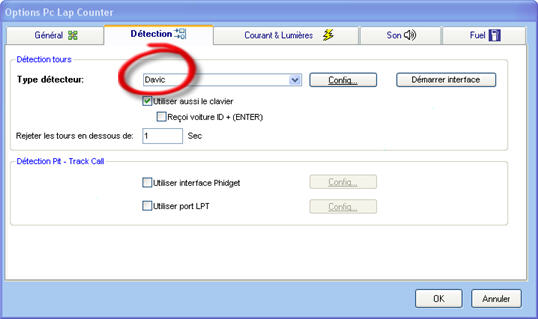
- In the options screen, choose “Davic” as the detector type and click the “Setup...” button.
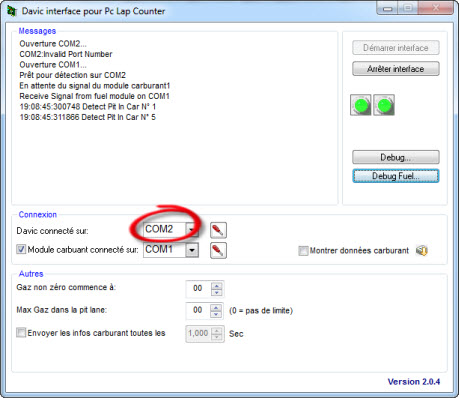
- Change the serial port if necessary...
- If you have the fuel module, tick “Fuel module connected at” and select the serial port.
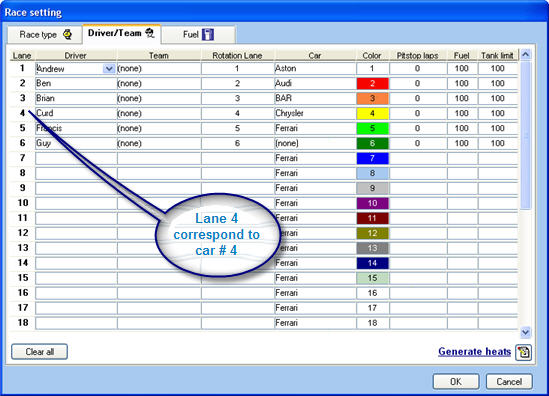
- Then you only need to assign drivers to the right lanes when you set up a race (lane 1 corresponds to car 1, lane 2 to car 2, etc.).