DS Racing DS-030 DS-300 DS-200
Pc Lap Counter works with the DS lap counters from DS Racing:
Pc Lap Counter includes an interface to read data from the DS lap counters (DS-030, DS-300, DS-200 and DS-0045).
With Pc Lap Counter, your DS lap counter gains more functionality such as sound, rotation, teams, gap, lap history, large display, and more (more than WinSlot).
To connect the DS lap counter to the PC, you only need a male/female serial “mouse extension” cable (example: serial mouse extension cable HAMA 242155).
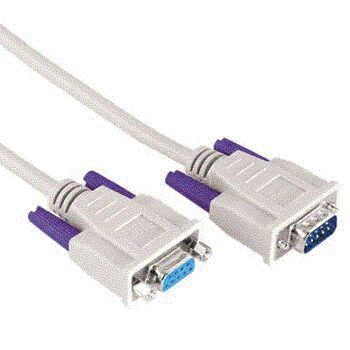
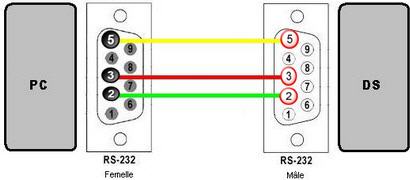
If you want to make your own cable,
here is the cable diagram.

If your computer does not have a serial port, you can use a USB/RS232 adapter.
How to configure Pc Lap Counter for the DS lap counter:
- Start Pc Lap Counter normally.
- In the options screen, choose the type of your DS (DS-030, DS-200 or DS-300) and click the “Setup...” button.
- Change the serial port and baud rate if necessary (the DS-030 works at 4800 baud; some DS-200 and DS-300 units work at 4800 or 56000 baud).
- For the DS-300 and DS-200:
Each time you launch Pc Lap Counter, you need to synchronize it with the DS.
To synchronize, press the start/stop button of the DS lap counter or let a car pass the detector.
Synchronization is successful when the light in the DS interface of Pc Lap Counter turns GREEN.
You do not need to do this at every race or segment, only after launching the Pc Lap Counter program. - Then you only need to assign drivers to lanes when you set up a race.
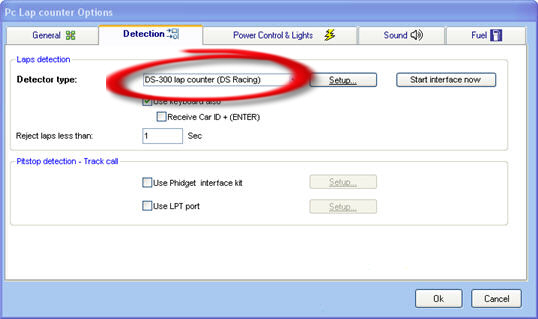
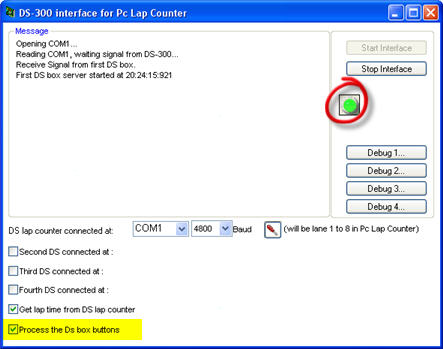
When you tick the option “Process the DS box buttons”, Pc Lap Counter processes the DS buttons like this:
- The DS START button starts the race in PCLC with the countdown. If you do not want the countdown, set
the race option “Start Countdown” to 0. - The DS STOP button aborts the race in PCLC (it stops the race definitively!).
- The DS PAUSE button pauses the race in PCLC.
- The DS RESUME button resumes the race in PCLC.
Here is the diagram of the cable to connect the DS to the serial port of the PC (thanks to Konrad!)
Setting up the DS for Pc Lap Counter:
As you know, Pc Lap Counter is a race management software: the whole race is managed by Pc Lap Counter and not by the DS, so all race settings must be made in Pc Lap Counter and not in the DS (for Pc Lap Counter, the DS is just a detection system).
The best way to use your DS with Pc Lap Counter is therefore to set your DS to 9999 laps and let Pc Lap Counter do the rest.
DS Stop & Go box and Pc Lap Counter:
The DS Stop & Go box is not supported by Pc Lap Counter, because it cannot be controlled by a computer (it cannot receive commands from the computer).
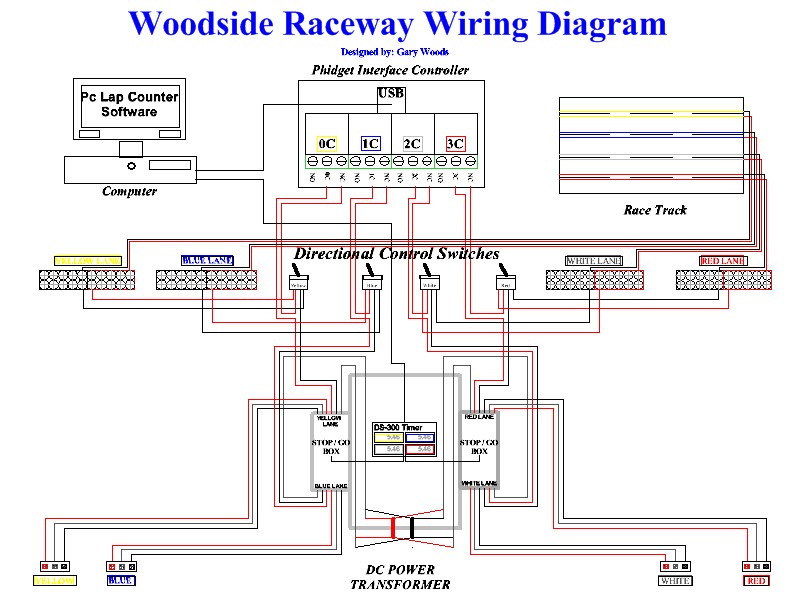
To manage power control with Pc Lap Counter, you need to buy a Phidget interface and connect each lane to it, or use the parallel port to control relays (see the power control section).
If you want to keep your DS Stop & Go box, the following diagram shows how to switch the power control to the Phidget interface (when you use your DS with Pc Lap Counter) or to the Stop & Go box (when you use your DS without Pc Lap Counter).