
StopAndGo
Stop & Go management:
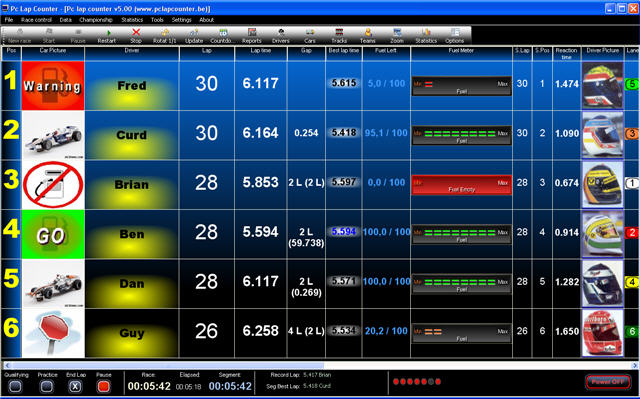
Since version 4.44, Pc Lap Counter manages Stop & Go penalties. You can apply a Stop & Go penalty to a driver with the “Update” button or with the hotkey CTRL + car/lane number. Pc Lap Counter automatically applies a Stop & Go penalty to a driver who makes a false start.
Pc Lap Counter also applies a Stop & Go penalty when a driver goes too fast in the pit lane (only available with Scalextric Digital with a second and third powerbase).
The driver has 3 laps (configurable) to serve his Stop & Go penalty. To do so, he must go to the pit entry and wait 10 seconds (configurable) before restarting. If he restarts earlier, the Stop & Go is considered not completed and he must return to the pits to serve it correctly.
During a Stop & Go penalty, Pc Lap Counter does not refuel the car. Also, if a driver does not serve his Stop & Go penalty within 3 laps (configurable), he is disqualified!
Pc Lap Counter signals the Stop & Go status to the driver with different sounds and visual cues, such as:

Driver received a Stop & Go penalty

Driver is in the pit lane and received a Stop & Go penalty


Shows the driver the remaining laps to serve his Stop & Go

Stop & Go penalty in progress

Stop & Go penalty ended, driver can restart

Stop & Go Failed !

Driver is in the pit lane for a Stop & Go penalty (manual refuel mode)
Note:
If your system does not send a PIT IN event and a driver receives a Stop & Go penalty, Pc Lap Counter directly cuts the power of the lane for 10 seconds (this requires a power control system) and rejects all laps during that period.
Stop & Go via the “Update” button:

Stop & Go Options:


If your system does not send a PIT IN event, untick the option “My system send PIT IN event”.
Start / stop the Stop & Go penalty with Scalextric Digital C7042 or Slot.it oXigen:
By default, the Stop & Go penalty starts automatically when the car stops in the pit lane. Since version 5.41, you can start it manually by pressing the LC or BRAKE button of your controller (LC button for Scalextric Digital C7042, BRAKE button for Slot.it oXigen).
With Scalextric Digital C7042, when the car stops in the pit lane, press the LC button of your controller to start the Stop & Go penalty and release it to stop.
With Slot.it oXigen, press the BRAKE button of your controller to start the Stop & Go penalty and release it to stop.
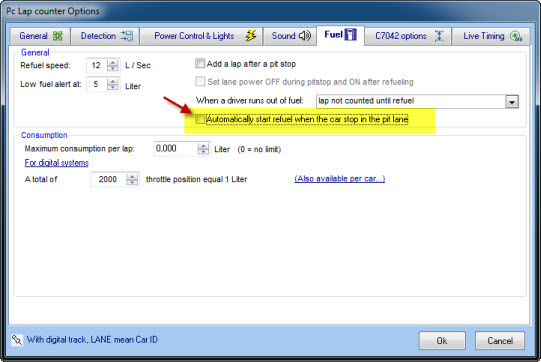
To enable the manual start of the Stop & Go penalty, untick the option “Automatically start refuel when the car stop on the pit lane”, like here:
See Also:
- Fuel management
- Power control
- Starting lights
- Track call using a Phidget interface, the parallel port or a webcam
- Pit stop detection using a webcam, a Phidget interface or the parallel port