
Parallel port trackcall
Using the parallel port for track call:
Warning: Pc Lap Counter only supports the parallel port on Windows XP, and only an onboard parallel port; PCI parallel ports, USB converters, etc. are not supported.
Since version 4.38, Pc Lap Counter can use the parallel port to receive commands. To do so, specify the input pin and the command to send to Pc Lap Counter.
An input pin can be activated by a simple switch. Here is an example using pins 10 and 12 to “pause” and “restart” the race:

Setting up Pc Lap Counter for parallel port “track call”:
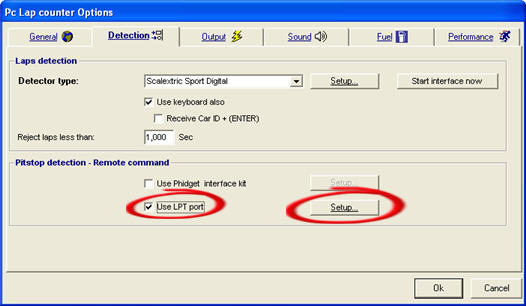
- In the options screen, specify that you will use the parallel port for track call and click the “setup” button, like here:
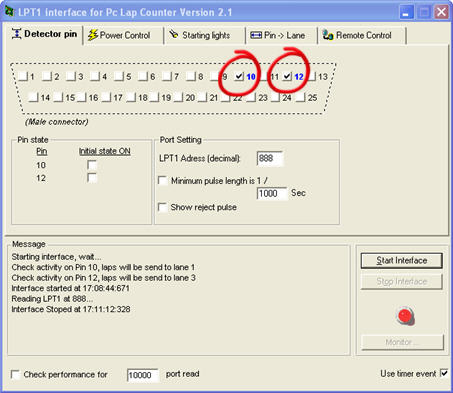
- After you click the “setup” button, the LPT interface of Pc Lap Counter starts. Specify the input pins to use for track call; here we use input pins 10 and 12:
- In the “track call” tab, specify the command to send for pins 10 and 12 and start the LPT interface, like this:

- Now just minimize the LPT interface and close the options screen by clicking “OK”.